Website platforms
Wix vs Squarespace: Which Should Your Business Choose?
Choose Wix if you want flexible page editing and an integrated starting point for bookings and selling. Choose Squarespace if you prefer building within a section-and-grid layout system for a service website, portfolio or small shop. Both can handle these jobs. The better choice is the one that fits your daily work without requiring awkward workarounds.
For Canadian buyers, the entry price does not settle it: Wix Light and Squarespace Basic both display CAD $21/month when paid annually. The difference becomes clearer when you add appointment scheduling, payment fees, business email and the work involved in maintaining the site.
This guide compares the classic Wix Editor with Squarespace 7.1 and their current plans for new buyers. Wix Harmony is a separate, newer editor; Wix Studio and older Squarespace plans also differ. If moving the complete website to another host is essential, neither is a good fit for that requirement: review the portability limits and alternatives first.
On this page
Wix vs Squarespace at a glance
| Decision | Wix Editor | Squarespace 7.1 |
|---|---|---|
| Trying it before paying | A free plan lets you try the editor; the custom-domain business setup needs a paid plan. | A 14-day website trial, with restrictions on payments and customer emails; a paid plan is needed to launch. |
| Everyday editing | Flexible placement of page elements; useful when the layout itself matters to you. | Sections and Fluid Engine grids provide a framework for arranging content. |
| Mobile layout | A mobile view is created automatically, with a separate mobile editor for adjustments. | Responsive layouts plus separate mobile arrangement in Fluid Engine sections. |
| Business blogging | Drafts, scheduled posts and categories support a regular publishing routine. | Drafts, scheduled posts, categories and tags support the same core publishing jobs. |
| SEO controls | Titles, descriptions, URL settings and more direct control over structured data. | Core page SEO controls, URL mappings and built-in structured data with customization limits. |
| Appointment booking | Core and above include scheduling/services; the free Bookings display does not accept bookings. | Acuity is a separate subscription; choose its tier by calendars and booking requirements. |
| Online selling | Core and above support payments. Ordinary store sales and paid Pricing Plans have different fee treatment. | All four current website plans can sell; Basic has an additional commerce transaction fee. |
| Apps and support | Wix apps plus third-party apps; phone/callback is among the support options. | Built-in tools, integrations and third-party Extensions; support uses chat and email. |
| Recurring cost | Website plan, domain, email, required apps and applicable payment fees. | Website plan, domain, email, any Acuity/other subscriptions and applicable payment fees. |
| Leaving the platform | The Wix website design cannot be exported to run on another host. | Selected content can be exported; the complete working design cannot. |
Our recommendation follows those tradeoffs. A feature being available does not tell you whether its workflow, plan limits or extra costs suit your business.
Squarespace vs Wix: which fits your business?
A service or portfolio website that generates enquiries
Start with Squarespace Basic if a structured layout approach suits you and the site mainly needs service pages, project images, a blog and an enquiry form. Start with Wix Light if you want more freedom over individual page elements. Their captured annual subscription prices are equal.
The choice changes if you need a specific integration, more collaborators or online bookings. Basic also supports selling, while Wix Light is not a payment-taking plan. Before paying, build one real service or portfolio page with your own text and images. Choose the editor in which you can update that page cleanly on desktop and mobile.
An appointment business
Start by evaluating Wix Core when you want your website and booking tools in the same platform. Consider Squarespace plus Acuity when Acuity’s scheduling workflow better matches the business, or you already use it successfully.
For a single calendar with appointments paid in person, our worked budget favours Wix on subscription cost. That recommendation changes if your preferred scheduler handles your calendar, intake or rescheduling needs better. Check booking and cancellation in the scheduler, then verify confirmation delivery where the trial permits it or during paid setup before launch. If you sell prepaid packages or memberships, compare those exact workflows and fees as well.
A small shop selling physical products
Compare Wix Core with Squarespace Core first if you expect regular orders. Squarespace Basic can be sensible for low sales, but its additional 2% commerce fee can outweigh the lower subscription. In our store example, the two Core plans are only CAD $12/year apart before any eligible email promotion.
The decision should then turn on product options, checkout, shipping, tax setup, stock management and the integrations you actually need. Use an available test mode for one representative product and its fulfilment workflow, then finish any blocked checks during paid setup before launch. An essential connector or missing product option can matter more than a small subscription saving.
Design, mobile editing and blogging
Which is easier to edit?
Wix Editor gives you more freedom to position individual elements; Squarespace gives you sections and Fluid Engine grids to work within. Choose based on the changes you expect to make yourself.
Think about a normal change: replacing a photograph, adding a longer service description and moving the enquiry button. Wix’s placement freedom can help you get a particular arrangement, but it also leaves you responsible for keeping spacing and alignment consistent. Squarespace’s sections and grids can make that decision more structured, although you still need to arrange the content thoughtfully.
Neither requires you to write code for ordinary page edits. Custom functionality is a different question. Squarespace’s current Basic plan includes basic CSS access; advanced code features and premium integrations sit on higher plans. If you need a particular script or embedded tool, check that exact requirement before buying.
Both need a mobile check
Wix automatically creates a mobile view and lets you adjust it in its mobile editor. Some elements can be hidden or require rearranging. A desktop change should therefore be followed by a mobile check.
Squarespace uses responsive layouts. In Fluid Engine sections, you can arrange mobile blocks separately from desktop. Text or link changes can still affect both views. This flexibility does not remove the need to check a real phone.
For either platform, inspect the navigation, image crops, text order, form fields and booking or checkout buttons. A page that looks good in the editor can still be awkward for a customer using a small screen.
What happens if you make a mistake?
Wix can restore a saved version of the site, which is useful after a layout change goes wrong. That is not a complete backup of the business: restoring the site does not roll back app data such as store orders or booking appointments.
Squarespace lets you restore deleted pages and blog posts within 30 days. Deleted text and blocks cannot be recovered after you close the editor. Keep original content and files outside either platform, and check what a recovery action actually restores.
Blogging: test the publishing routine
Both platforms support the basics a business blog needs. Wix provides drafts and scheduled posts, plus categories. Squarespace provides post editing, categories and tags plus scheduled publishing.
For a regular advice blog, choose the workflow you can maintain: create a post, add images and internal links, set its search title, schedule it, then find and update it later. If you have a large existing archive or several contributors, test roles, organization and export needs before treating either as a straightforward move.
Is Wix or Squarespace better for SEO?
Both provide the core controls needed to work on a business website’s SEO. Wix offers more direct documented control over structured data; that is a feature advantage for a specific requirement, not proof that Wix websites rank higher.
| Task | Wix | Squarespace |
|---|---|---|
| Page relevance | Edit page titles, descriptions and URL settings; configure defaults by page type. | Edit SEO titles/descriptions and URL slugs. |
| Changing URLs | URL changes can offer automatic redirects; check the resulting old URL. | Use URL mappings for redirects; do not assume changing a slug creates one. |
| Structured data | Customize or replace preset markup within documented limits. | Automatic markup is provided for supported content; the built-in markup cannot be directly edited or removed according to its documentation. |
Both also generate sitemaps. These features help manage a site, but the content, internal links, accessibility to search engines and actual page experience still need work. Adding structured data does not guarantee a rich result.
Our practical recommendation is to choose the platform on which you can publish useful service pages, keep information current and manage changes reliably. If you already have an SEO specialist, ask them to check any specific schema, redirect or integration requirements before the design is built.
Speed depends on the pages you build. Test your intended pages with their actual images, fonts and third-party tools; a platform name alone does not establish how quickly your site will load.
Sources: Wix SEO settings; Squarespace SEO checklist; Squarespace URL mappings; Squarespace sitemaps and structured data.
Wix vs Squarespace pricing in Canada
The captured entry plans tie at CAD $252 for a year. Compare the plan needed for your business, rather than assuming each platform’s cheapest plan includes the same features.
The following prices were checked on October 29, 2026. The monthly figures are annual-billing equivalents, not month-to-month prices; the annual amounts are calculated as 12 times the displayed monthly rate. Budget applicable tax separately.
Scroll sideways to compare all columns.
| Plan | Monthly equivalent | Calculated annual subscription |
|---|---|---|
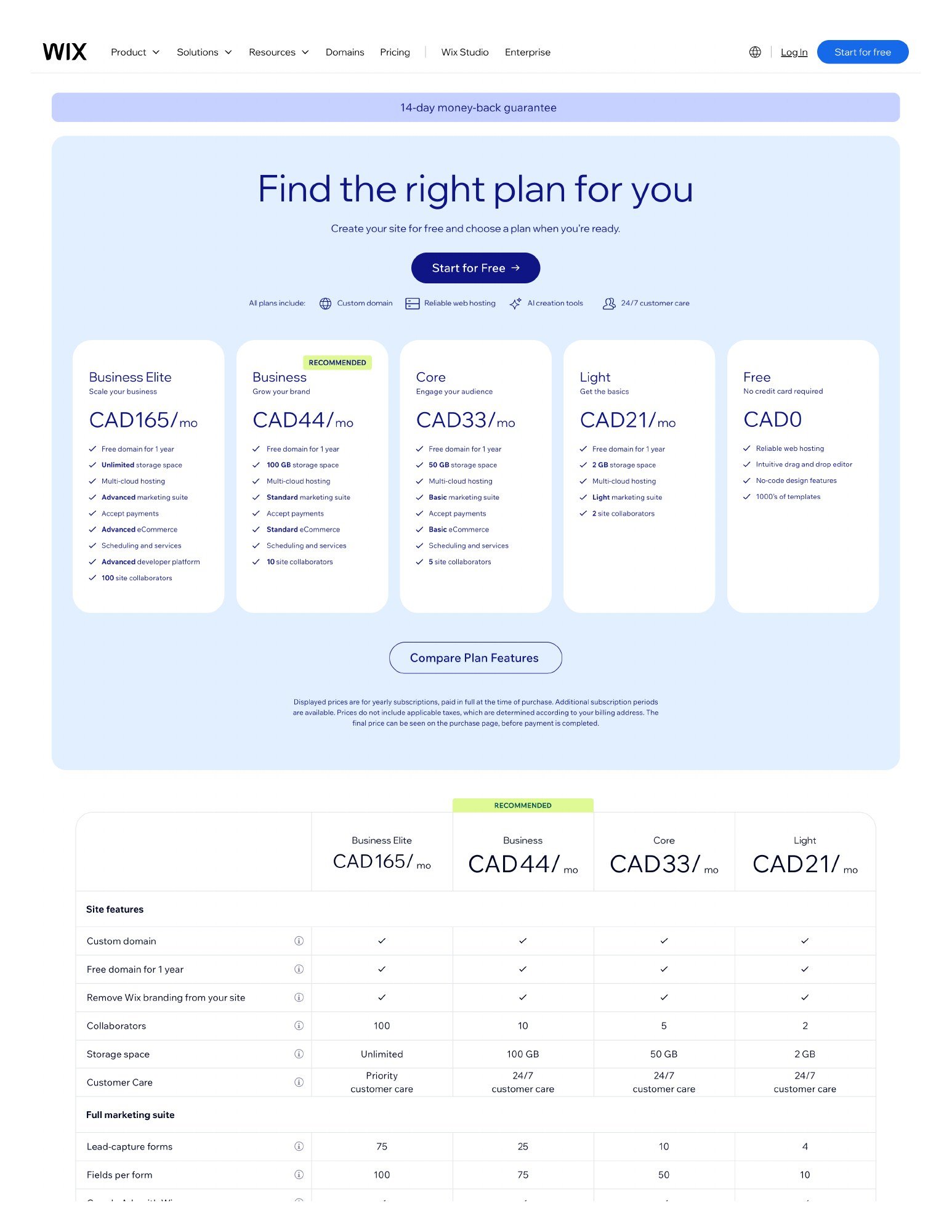
| Wix Light | CAD $21 | CAD $252 |
| Wix Core | CAD $33 | CAD $396 |
| Wix Business | CAD $44 | CAD $528 |
| Wix Business Elite | CAD $165 | CAD $1,980 |
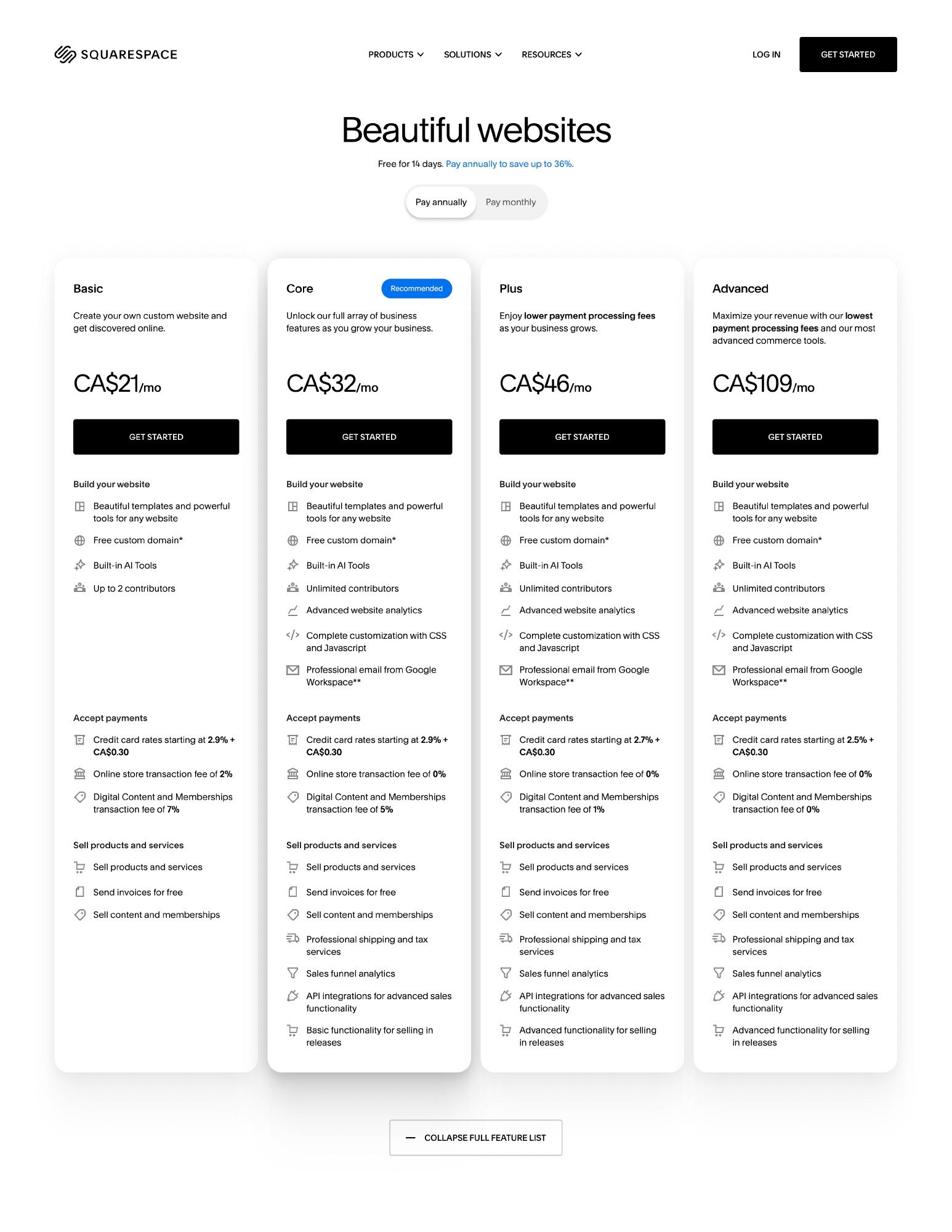
| Squarespace Basic | CAD $21 | CAD $252 |
| Squarespace Core | CAD $32 | CAD $384 |
| Squarespace Plus | CAD $46 | CAD $552 |
| Squarespace Advanced | CAD $109 | CAD $1,308 |
Dated Canadian pricing captures from Wix plans and Squarespace pricing. Prices and eligibility can change; check the selected plan and billing cycle before purchase.
See the original Canadian pricing screenshots
Captured October 29, 2026. These images show the first page of each pricing capture used for the table above. Amounts are monthly equivalents paid annually; they are not monthly-billed quotes. Open either image at full size to inspect the details. Current prices and terms may differ.
Light, Core, Business and Business Elite: CAD $21, $33, $44 and $165 per month on annual billing. Check current Wix pricing.
 Open full-size Wix screenshot
Basic, Core, Plus and Advanced: CAD $21, $32, $46 and $109 per month on annual billing. Check current Squarespace pricing.
 Open full-size Squarespace screenshot
Wix also has a free plan, useful for trying the editor, but a paid plan is needed for the custom-domain business setup compared here. Wix offers true monthly billing; obtain its current Canadian monthly quote if you do not want annual commitment. The Squarespace monthly-billing capture shows Basic CAD $30, Core $45, Plus $59 and Advanced $139 per month.
What the website subscription does—and does not—cover
Hosting is included in both website platforms. Do not add a second hosting bill for the same hosted site. A domain, business mailbox, scheduling subscription and paid app are separate things, even when a first-year offer makes one temporarily free.
- Domain: an eligible annual plan may include a new domain for the first year. That does not make renewals free, and an existing domain or particular extension may not qualify.
- Email: budget the provider and number of paid mailboxes you need. Eligible Squarespace Core, Plus and Advanced buyers can receive one new Google Workspace Starter inbox for the first year; additional users and later renewal are paid.
- Bookings and apps: price the required scheduler, tier and paid integrations. Installing an app does not establish that all of its features are included.
- Work on the website: content updates, a redesign, marketing and specialist support are separate from the platform subscription.
Use our website maintenance costs in Canada guide if you are also comparing paid help. Those service costs should be scoped separately from the recurring software budget below.
Bookings, online payments and selling: what is included?
Appointment booking is different from displaying services
Wix Core is the first paid booking-and-payment plan in the captured standard lineup. Light is not the equivalent appointment package. The free version of Wix Bookings can display services but does not accept bookings.
For a Squarespace website using Acuity, pay for both subscriptions after the scheduling trial. Acuity can also be used without a Squarespace website. The captured Acuity prices below are USD, so they cannot be added directly to a CAD website price.
Scroll sideways to compare all columns.
| Plan | Annual billing: monthly equivalent | Calculated annual cost | Monthly billing | Relevant capability |
|---|---|---|---|---|
| Starter | US$16 | US$192 | US$20 | 1 calendar; appointments and confirmation/reminder emails |
| Standard | US$27 | US$324 | US$34 | 6 calendars; packages, subscriptions, memberships and SMS reminders, subject to regional availability |
| Premium | US$55 | US$660 | US$69 | 36 calendars; advanced customization/API and removal of Acuity branding |
Sources: Acuity pricing and Acuity billing and payment methods. The captured trial is seven days. Processor fees are additional when collecting online payments.
Before choosing a tier, list the number of calendars, appointment types, classes, packages, deposits, reminders and staff or location rules you need. A plan that covers one-to-one appointments is not automatically the right plan for every workshop or membership business.
What about an ordinary online shop?
Wix Core includes store features and abandoned-cart recovery in the captured plan comparison. Squarespace also includes abandoned-cart recovery on Basic, Core, Plus and Advanced. You do not need to move from Squarespace Basic to Core just to obtain that feature. Its commerce fee and the higher plan’s other capabilities are the relevant upgrade considerations. Check product options, shipping and required connections against your own catalogue.
Separate platform fees from payment processing
A platform transaction fee is an additional percentage attached to a particular selling feature or plan. A processing fee pays for handling the payment. A 0% platform fee does not mean card payments are free.
| Sale type | Captured platform fee | What to watch |
|---|---|---|
| Ordinary Wix Stores sale | No additional Wix platform transaction fee in the store guidance used for this comparison | Normal processor fees and any required paid apps still apply. |
| Paid Wix Pricing Plans | Core 4%; Business 2%; Business Elite 0% | Includes one-time paid plans and recurring charges. Bookings memberships and prepaid packages use this feature. |
| Squarespace ordinary commerce | Basic 2%; Core, Plus and Advanced 0% | Current Basic can sell products; its extra commerce fee is the relevant cost difference. |
| Squarespace digital content and memberships | Basic 7%; Core 5%; Plus 1%; Advanced 0% | This category covers paid access to courses, video pages and member sites; an ordinary downloadable store product uses the commerce fee category. |
| Acuity appointment payments | No Squarespace website transaction fee on Acuity appointments | Acuity subscription and the chosen processor’s fees remain. |
For Wix, a customer paying for one appointment is different from a customer buying a prepaid package through Pricing Plans. A one-time package purchase can still incur the Pricing Plans fee. We do not apply that fee automatically to ordinary per-session bookings or Stores checkout. Recurring physical-product orders in Wix Stores are also a separate product flow.
Sources: Wix Pricing Plans transaction fees; Wix memberships and packages; Wix store guidance; Squarespace transaction fees and processing. Existing account terms should be checked separately.
Canadian card-processing rates
The store examples use eligible domestic standard cards with each platform’s own payment service. Wix Payments lists 2.9% + CAD $0.30 for this category. Squarespace Payments lists 2.9% + CAD $0.30 on Basic/Core, 2.7% + CAD $0.30 on Plus and 2.5% + CAD $0.30 on Advanced.
For Canadian American Express payments, Wix lists 3.5% + CAD $0.30; Squarespace lists 2.9% + CAD $0.30 across these four plans. International-card and currency-conversion charges, refunds and disputes can also change the calculation. Use your actual payment mix and processor; Stripe, PayPal or another provider may have different terms.
Rate sources: Wix Payments service fees and Squarespace Payments rates.
What a complete website budget looks like
A useful budget combines the website plan with the tools and fees your business will actually use. These examples use the same stated requirements on both sides. They are illustrations, not vendor quotes or client results.
Assumptions for all three examples: annual website billing; one external mailbox budgeted at CAD $120/year; an eligible new domain costing $0 in year one; and an illustrative CAD $25 domain renewal. The mailbox and renewal figures are assumptions, not quoted Wix or Squarespace prices. No extra paid app is required for the limited workflows described. Replace these amounts with your actual subscriptions and eligibility.
Totals are before tax on your subscriptions/services and exclude design work, advertising, inventory, postage and offline payment charges. Renewal estimates keep today’s plan prices and billing cycles unchanged; they are not guaranteed future invoices.
Budget formula: website + domain + email + required scheduling/apps + applicable platform fees + processing. Add taxes and any additional business costs that apply to you.
Example 1: an enquiry website
A small service business needs pages, an enquiry form and one mailbox, with no bookings or online checkout. The only modeled extras are the CAD $120 mailbox and the CAD $25 domain renewal after the eligible free first year.
Scroll sideways to compare all columns.
| Annual amount · CAD | Wix Light | Squarespace Basic |
|---|---|---|
| Website subscription | $252.00 | $252.00 |
| Required scheduler | $0.00 | $0.00 |
| Processing fees | $0.00 | $0.00 |
| Platform transaction fees | $0.00 | $0.00 |
| Illustrative external mailbox | $120.00 | $120.00 |
| Other required paid apps | $0.00 | $0.00 |
| Domain · year one / renewal | $0.00 / $25.00 | $0.00 / $25.00 |
| Year-one total | $372.00 | $372.00 |
| Renewal-year estimate | $397.00 | $397.00 |
The result: the modeled costs are equal. Trial the editing workflow and required integrations rather than choosing on the headline price.
Example 2: one calendar, appointments paid in person
This business needs online scheduling and confirmation emails, but no packages, memberships, SMS or online payment collection. Offline card/POS charges are outside this example. It uses the same CAD $120 mailbox, eligible free first-year domain and CAD $25 renewal assumption.
Native annual subscription amounts are CAD $396 for Wix Core, versus CAD $252 + US$192 for Squarespace Basic and Acuity Starter. For illustration only, use US$1 = CAD $1.40 and no bank currency markup. This is a hypothetical rate, not a current exchange-rate quote. Acuity therefore contributes 192 × 1.40 = CAD $268.80.
Scroll sideways to compare all columns.
| Annual amount · CAD | Wix Core | Squarespace Basic + Acuity Starter |
|---|---|---|
| Website subscription | $396.00 | $252.00 |
| Required scheduler | $0.00 | $268.80 |
| Processing fees | $0.00 | $0.00 |
| Platform transaction fees | $0.00 | $0.00 |
| Illustrative external mailbox | $120.00 | $120.00 |
| Other required paid apps | $0.00 | $0.00 |
| Domain · year one / renewal | $0.00 / $25.00 | $0.00 / $25.00 |
| Year-one total | $516.00 | $640.80 |
| Renewal-year estimate | $541.00 | $665.80 |
The result: Wix costs CAD $124.80 less in this illustration. Choose the Squarespace/Acuity combination if its scheduling workflow is worth the difference for your business. Existing scheduling software, more calendars, packages or reminders can change the required plan and cost.
To personalize the conversion, calculate the USD charge × your CAD-per-USD rate × (1 + your bank’s markup as a decimal). Then add any other required subscriptions or fees.
Example 3: a shop taking 100 orders a month
Assume 1,200 orders/year and CAD $60,000 actually charged through the processor. Separately assume CAD $60,000 is eligible for the commerce platform fee. These two fee bases are equal only for this example; actual bases can differ and may include customer checkout tax or shipping.
All orders use eligible domestic standard cards. There is no Wix Pricing Plans revenue, paid tax app, AmEx, cross-border payment, currency conversion, refund or dispute in the model. Add those costs if your store needs or incurs them. The mailbox is again CAD $120, the eligible first-year domain $0 and assumed domain renewal CAD $25.
At 2.9% + $0.30, processing is (60,000 × 0.029) + (1,200 × 0.30) = CAD $2,100/year. Squarespace Basic adds CAD $1,200 in commerce fees. Plus processing at 2.7% is CAD $1,980.
Scroll sideways to compare all columns.
| Annual amount · CAD | Wix Core | Squarespace Basic | Squarespace Core | Squarespace Plus |
|---|---|---|---|---|
| Website subscription | $396.00 | $252.00 | $384.00 | $552.00 |
| Required scheduler | $0.00 | $0.00 | $0.00 | $0.00 |
| Processing fees | $2,100.00 | $2,100.00 | $2,100.00 | $1,980.00 |
| Platform transaction fees | $0.00 | $1,200.00 | $0.00 | $0.00 |
| Illustrative external mailbox | $120.00 | $120.00 | $120.00 | $120.00 |
| Other required paid apps | $0.00 | $0.00 | $0.00 | $0.00 |
| Domain · year one / renewal | $0.00 / $25.00 | $0.00 / $25.00 | $0.00 / $25.00 | $0.00 / $25.00 |
| Year-one total | $2,616.00 | $3,672.00 | $2,604.00 | $2,652.00 |
| Renewal-year estimate | $2,641.00 | $3,697.00 | $2,629.00 | $2,677.00 |
The result: Squarespace Core is CAD $12/year below Wix Core using the common mailbox budget. That small difference is less useful than confirming the right product, shipping and integration workflow. Squarespace Basic is more expensive at this order value, and Plus’s processing saving does not yet pay for its higher subscription.
Email-offer alternative: if you qualify for Squarespace’s first-year inbox offer and it replaces the assumed mailbox, subtract CAD $120 from the Core or Plus year-one example. That gives CAD $2,484 for Core or CAD $2,532 for Plus. Additional inboxes cost extra. Use the actual email renewal rate for later years; the CAD $120 assumption is not a quote for that renewal.
When does a higher plan pay for itself?
These thresholds isolate one fee saving, with other requirements and costs held equal. They use annual-billing equivalents and a representative monthly average; one busy month alone does not justify a year-long upgrade.
Scroll sideways to compare all columns.
| Upgrade | Extra monthly equivalent | Fee saving considered | Break-even monthly amount |
|---|---|---|---|
| Squarespace Basic → Core | CAD $11 | 2 percentage points of ordinary commerce fees | CAD $550 of commerce-fee-eligible sales |
| Wix Core → Business | CAD $11 | 2 percentage points of Pricing Plans fees | CAD $550 charged through paid Pricing Plans |
| Wix Business → Business Elite | CAD $121 | 2 percentage points of Pricing Plans fees | CAD $6,050 charged through paid Pricing Plans |
| Squarespace Core → Plus | CAD $14 | 0.2 percentage points of standard-card processing | CAD $7,000 of eligible standard-card charges |
For example, Wix Core to Business is (44 − 33) ÷ (0.04 − 0.02) = CAD $550/month. That threshold concerns paid Pricing Plans, including one-time packages. It does not mean every Wix shop should upgrade once its ordinary sales reach $550.
Integrations and support: check the dependency before you buy
Choose around the tool you cannot replace, not the number of apps advertised. For example, a shop may need orders to reach its fulfilment software; a service business may need enquiries to reach its existing CRM. Confirm the direction of the data transfer, required plan, usage limits, extra subscription and who supports failures.
Wix’s App Market includes Wix and third-party apps. Some features require a paid plan or app upgrade, and third-party developers handle their own app support. Squarespace Extensions connect third-party services, including accounting and fulfilment tools. Connecting an Extension does not add a Squarespace connection charge, but the service can require its own subscription. Extensions are distinct from plan-specific premium integrations.
English and French: include the booking journey
With classic Wix Editor, Wix Multilingual can translate booking services and booking pages. Check the supported languages and any text that needs manual review. This should not be assumed for Wix Harmony, which currently does not include Wix Multilingual.
Squarespace 7.1 offers a Weglot integration for multilingual websites. Its word and language limits can require a separate paid subscription, and the integration does not translate Acuity. A bilingual appointment business should therefore verify the website, scheduler and confirmation messages separately before choosing either setup.
Support and ongoing responsibility
If phone help matters to you, Wix lists phone/callback options alongside chat and email, subject to language, time zone and issue. Squarespace offers email and live chat and does not offer phone support. Check current hours for the channel you need.
Platform support also differs from someone managing your website. Assign responsibility for content changes, expired integrations, renewals and checking that enquiry or checkout routes still work.
Changing templates, exporting and moving later
You can redesign a site without necessarily changing its template, but neither platform gives you a complete website that can simply be moved to any other host.
Wix does not let you switch the template of an existing site. Its documented alternative is to create a new site and transfer eligible elements. You can still edit the design you already have. Moving from Wix Editor to Wix Studio is also a different project; switching the workspace does not convert the site into the Studio editor. Wix also says an existing Wix Editor site cannot currently be migrated into Harmony.
Squarespace 7.1 also cannot switch templates, but its templates share the same underlying feature and styling system. You can change styles and page structure without starting from an entirely new site. Older 7.0 sites have different template-switching rules.
For leaving the platform, Wix’s website design cannot be exported for hosting elsewhere. Squarespace can export selected content to a WordPress-format XML file, but that is not a complete working site: styles, custom CSS and unsupported page/block types still need separate work. Products and contacts have separate export routes.
Before moving or cancelling:
- List pages, posts, products, contacts, appointments and other data that must be retained; check each export separately.
- Keep original images and files, and rebuild any layouts or integrations the export cannot carry.
- Map old URLs to their intended replacements and test redirects.
- Confirm control of the domain, login recovery and business email; keep required renewals active.
- Test forms, bookings, payments and email on the replacement setup before retiring the old one.
Keep the owner account and domain under business-controlled access, with appropriate collaborator permissions for anyone helping. Cancelling the website is not a reliable way to cancel every related subscription: check domain, email, apps and scheduling individually.
Before you commit: try these five tasks
Use the same real page and business requirement in each platform. Record what you can complete yourself, where you need help and which extra subscription becomes necessary.
Allow for trial restrictions. Squarespace’s 14-day website trial is private and cannot accept payments or send customer notifications or form-submission emails. Test modes help with some checks, but complete blocked payment and email checks during paid setup before launch. Acuity has its own separate trial. Wix’s free plan likewise does not establish that paid bookings and payment features are ready.
- Edit a page on desktop and mobile. Add your own service description, images and enquiry button. Check reading order and spacing on a phone. Repeated layout repairs are a reason to reconsider the editor.
- Create and update content. Create a post or service page, set its title and URL, add an internal link, then find it again to make a change. Choose a routine you can sustain.
- Complete the customer task. Try the required appointment or store flow using an available test mode. Check staff access and the available cancellation/refund settings. List any payment or email checks the trial blocks, confirm the required paid tier and complete those checks before launch.
- Check the SEO controls you will use. Locate titles, descriptions and redirects. Have your specialist verify any unusual markup or integration need.
- Price the next year and the exit. Record the actual domain, inboxes, scheduler, apps and renewal terms. Confirm which data can leave before committing to the platform.
When neither platform is the best fit
Broaden the shortlist if your requirement is control over hosting and the complete implementation, a complex publishing workflow, or a business process that needs extensive custom development. Self-hosted WordPress may be worth evaluating if you also have a plan for maintenance and technical responsibility. Our WordPress vs Wix comparison explains that different ownership tradeoff.
If online retail is the core of the business and your catalogue, fulfilment or multi-channel requirements are complex, compare dedicated ecommerce options against those exact needs before choosing either builder. A visual editor should not decide a business-critical system by itself.
How we made this comparison
This is a researched comparison using official product documentation, Canadian Wix and Squarespace pricing captures, USD Acuity pricing captures, and the calculations shown above. Pricing captures are dated October 29, 2026; product documentation was reviewed October 29–30, 2026. Recommendations reflect the stated business requirements; the worked budgets are hypothetical examples.
Webbies is a Hamilton-based website and SEO agency. Our own website previously ran on Wix before we moved it to WordPress. We also previously supported SEO and website updates for Glamorous Nails & Beauty on Squarespace. This is historical experience; the client’s current design is not presented as our work.
Our current web-development offer includes WordPress, which informs our perspective. This comparison uses documented features and stated business requirements. We have not tested today’s Wix and Squarespace versions side by side, measured their support response times or established ranking gains from choosing either platform.
Need help choosing a workable setup?
Send us your current website, the tasks customers need to complete, the tools you already use and what you want to edit yourself. Webbies can review those requirements and discuss a suitable website, redesign or SEO scope. Recommendations and any proposed work depend on the setup; the platform prices in this guide are not Webbies service packages.
Discuss your website with Webbies Explore website design and development